
Software that adapts to your warehouse. Not the other way around.
Receive, store, pick, ship. On the scanner and on screen, adjustable in plain language, without a project. An AI-native WMS, as part of MintIQ or standalone next to the ERP you have today.

Three situations we came across in warehouses
Before they started working with MintIQ. You might recognize one. You might recognize all three.
The system says the stock is there, the floor says otherwise
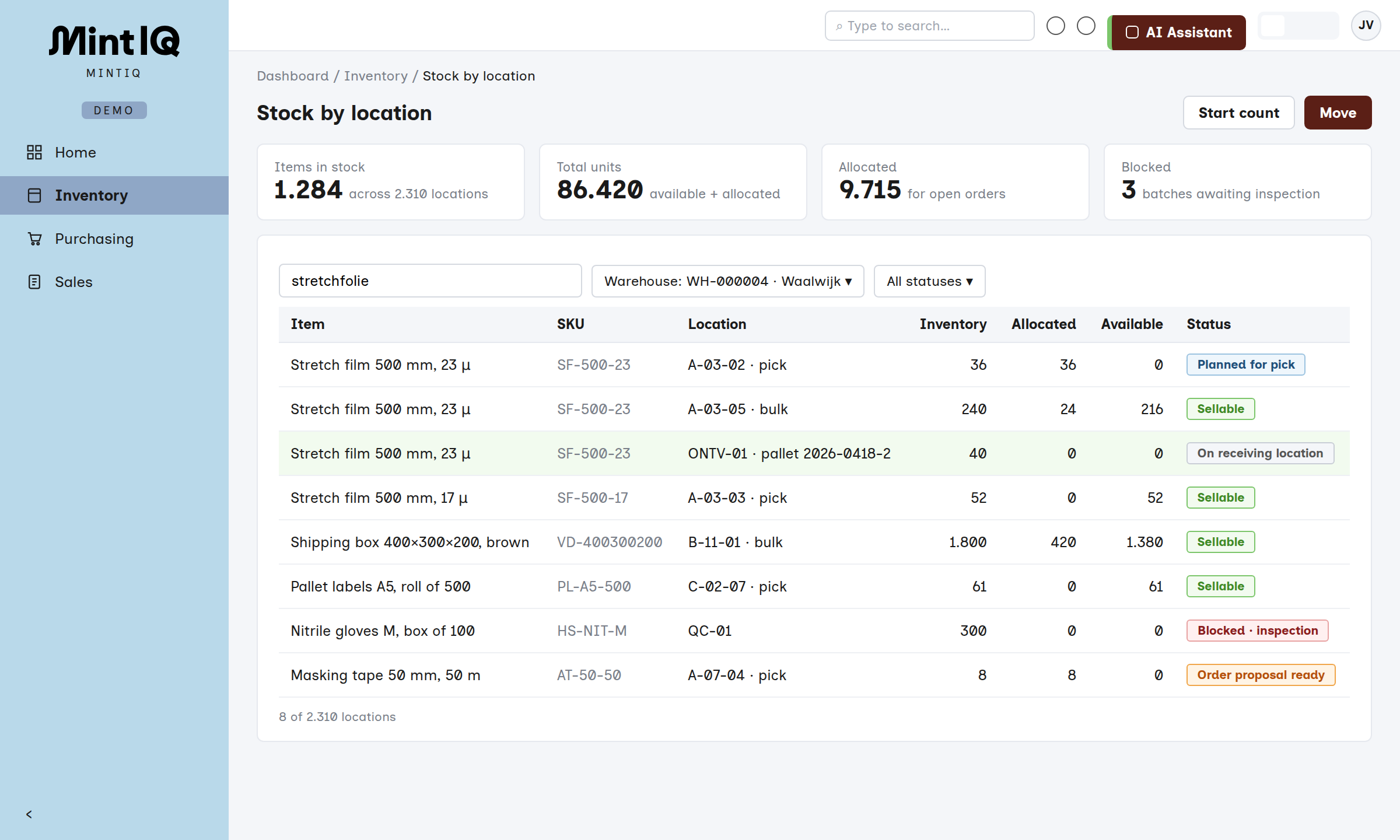
As soon as a pallet is booked in, it is sellable. Except it is still on the dock, or has been waiting two weeks to be put away. Sales promises it to a customer, the warehouse goes looking for it.
One person hands out the work all day
He knows exactly who can do what. That works, until that person is out. Then nobody knows. And meanwhile the backorders cost two to three hours a day of sorting out, shuffling and calling back.
The printer runs packing slips for an hour
Someone sticks them on the pallets and the waybill is done by hand. Meanwhile half pallets are parked everywhere, waiting for the zone to be finished.
Everything within the walls of the warehouse
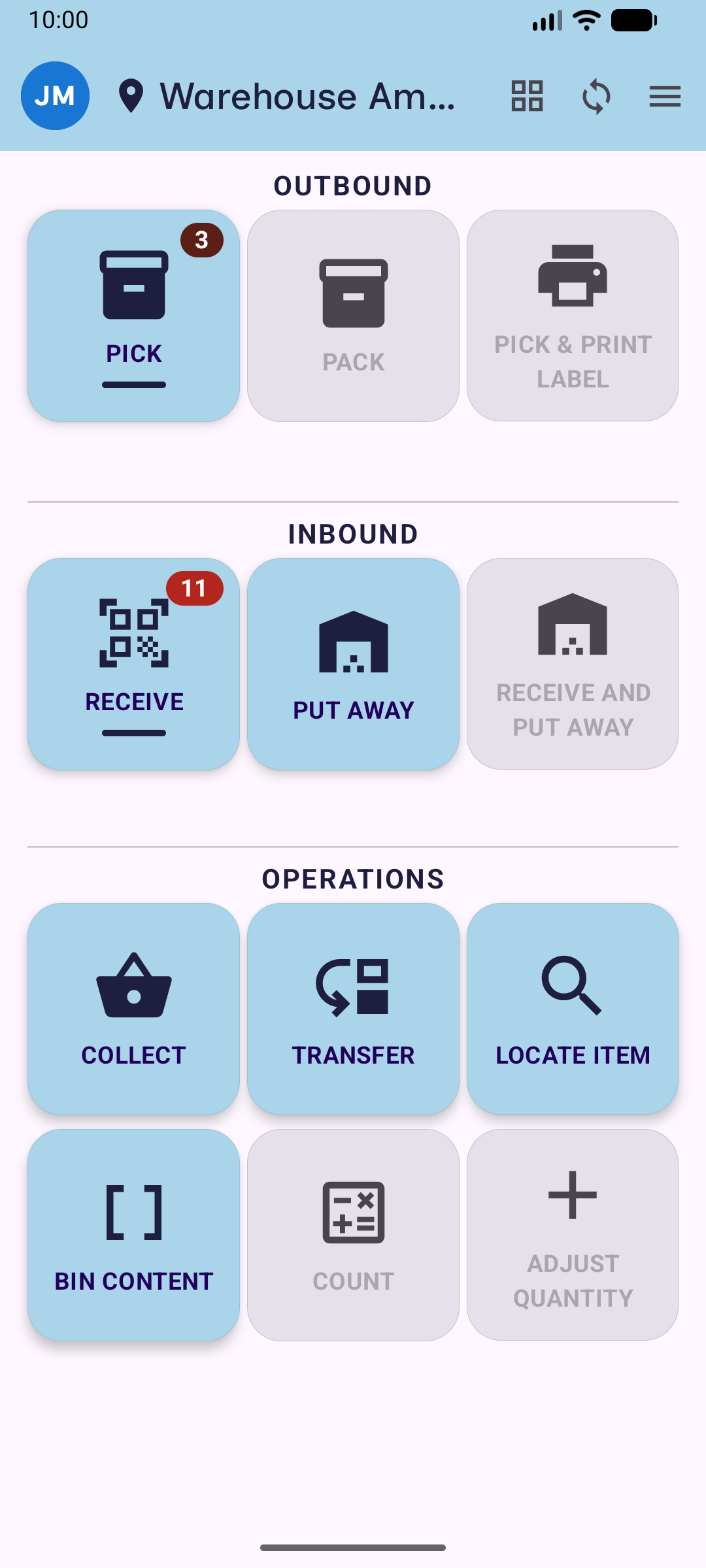
MintIQ handles everything within the walls of the warehouse: receiving, putaway, stock by location, picking, palletizing and shipping. On the scanner and on screen.
Orders and purchasing are in the same system, so every movement on the floor is immediately visible on the order. Keeping your current package for orders and invoices for now? Then the orders come in from there and every movement goes back automatically. Prices, terms and invoices stay where they are.
The assistant and the agents work inside the system, on your own data. A packing slip that arrives by email is already a receipt. And a warehouse rule you write in plain language.
From the truck that arrives to the pallet that leaves
Receiving and putaway
One scan field for everything: purchase order number, item or pallet label, the system works out what it is. If the supplier emails their packing slip, the receipt is ready before the truck arrives. Over-receipts are booked, but blocked. The system suggests the location, the operator scans it and may deviate. Stock on the receiving location is visible, but only sellable once it is in its place. If part of it is already sold, it goes straight through to dispatch.
In short- One scan field, the system recognizes what you scan
- Blocked stock is a status, not a separate place
- Only sellable once it is in its place
One queue, nobody has to hand out work
The system creates the tasks itself and puts them in one queue. All orders for one customer go in one round, split per zone. Every ten minutes the sequence is recalculated: backorders first, then by delivery day. Whoever asks for work gets the next task immediately and walks off. Rush you set on the order, or ask the assistant. Assigning by hand is still possible, it just is no longer necessary.
In short- Tasks create themselves, in one queue
- Backorders first, then by delivery day
- The planner is in the system, not in one head
app.mintiq.com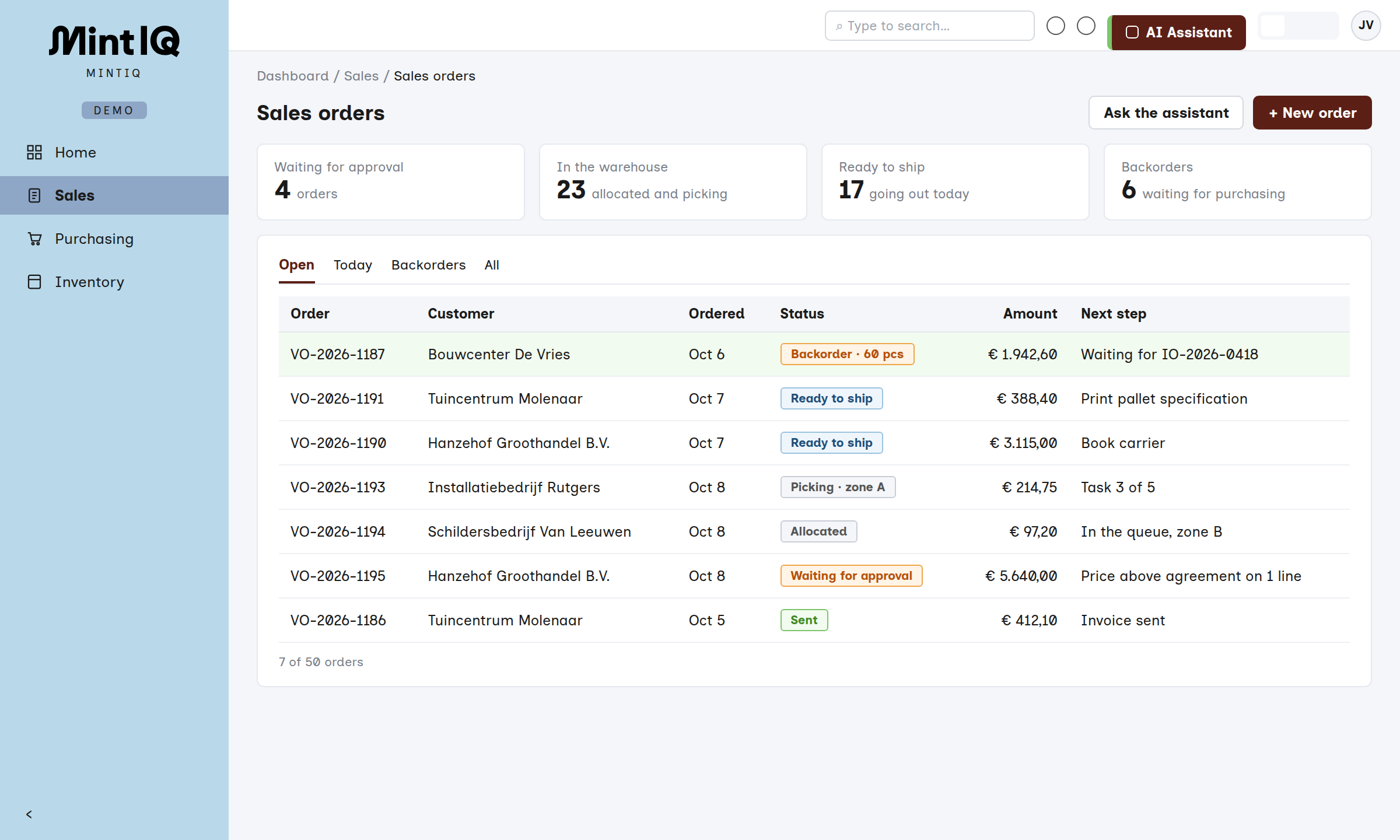
Every order shows where it is in the warehouse and what the next step is. Pick, and count while you are there anyway
Scan the location, then the item, then the quantity. Scan the box, and it counts the whole box. A full pallet goes ahead to dispatch while picking continues. If a pick empties a location, a count screen follows immediately. Always blind, with an empty quantity field. A cycle count per category replaces the big count at year end.
In short- Picking and counting are one movement
- Short? Pull a bulk pallet, pick the rest from it
- No more annual stock count
Ship with one document per pallet
For each pallet, MintIQ creates one pallet specification with an SSCC barcode: packing slip and label in one. You ship per pallet with a scan, or all at once at the end of the day. The shipping booking goes straight through, so the invoice can go out immediately. Per customer you set whether documents are printed or emailed, and where a shipper asks for it, the messages go via EDI.
In short- One document per pallet, with SSCC
- Customer agreements in plain language on the scanner
- Freight documents for a delivery day with one button
Adjusting is a conversation with the system, not a project
The warehouse changes: new customers, new items, a different layout. In most systems that means a change request and waiting. In an AI-native WMS you adjust it yourself, because the assistant can reach every setting.
Every screen on the scanner is a block. Remove a step, add a best-before date screen, rename a text: you set it up, without code, and per user you decide what appears on the scanner.
Rules you write in plain language: where bulk may be stored, which customer wants everything on one pallet, which supplier goes into quality control. Reports you make by asking for them.
Blocks on or off, per user
“Bulk above the pick location, up first, then to the right.”A rule, written the way you would say it
It is already in there
MintIQ is one system. You can start with the warehouse and switch on the rest when you are ready. No new integration, no new package.
Purchasing and orders
Purchase orders with lead times. Sales orders that already reserve against what is still coming in. And quotes.
Assembly
A work order reserves the components on release. The pick runs through the normal queue, and reporting complete books the stock over, also in parts.
Storage for clients
Stock per owner, each with their own rules and labels. Storage invoicing comes straight from the warehouse data.
Agents
A supplier emails that they will deliver late. An agent puts the new date on the purchase order and lines up the affected sales orders for the owner. Every action can be reviewed.
What functionality is in MintIQ?
Receipt
- Against purchase order, partial deliveries too
- Pallet advance notice (SSCC/LPN)
- GS1 label: SSCC, GTIN, batch, BBD
- Batch, serial and BBD per item
- Direct putaway or via the dock
- Blind receiving and returns
- Emailed packing slip becomes a receipt
Putaway
- Location suggested from your own rules
- Task-driven or scan-first
- Pallets, containers, mixed
- Fixed locations per item
Cross-docking
- Sold? Straight to dispatch
- Split or pallet per customer
Stock and locations
- Zones, aisles, racks, bins
- Per location, pallet and batch
- Block by batch, BBD or lot
- QC queue: approve or reject
- Batch and serial tracing (recall)
Allocation
- Soft (warehouse) and hard (location)
- Priority by order or delivery date
- Backorders fill themselves
- FEFO or FIFO
- Reserve against incoming purchases
Counting
- Cycle count plans per ABC class
- Always blind, difference recorded
- Count after the pick, in one round
Picking
- Per order, batch, cluster or full pallet
- Queue recalculated every 10 min.
- Bulk pallet to pick face before the pick
- Assign and hand over tasks
Packing and shipping
- One pallet specification with SSCC
- Carriers: DHL, DPD, Sendcloud and others
- Print or email documents
- EDI per shipper
- Transfers between warehouses
Scanner and screens
- Android app, ready-made processes
- Adjust screens without code
- Tablets and wall-mounted screens
- Voice assistant
You see your own warehouse working before you sign anything
You do not choose a new WMS based on a demo with someone else's data. So we turn it around: MintIQ runs on your own stock and orders first.
Rebuild
We rebuild your warehouse in a test environment, with your items and locations, and show it working.
Set up in blocks
Blocks of two weeks: inbound and stock, outbound and shipping, and the rest. Your people validate it on the scanner.
Trial run
Staff run through the real process on the MintIQ scanner, alongside their current work. On the first live day, nothing is new.
Fixed platform fee
Implementation within the platform is included in the license, and so is support. You can cancel per quarter.
Let's talk
Have a question, or want to know what MintIQ could mean for you? We are happy to help. Tell us briefly how your order flow works, and we will show you MintIQ with a process that looks like yours. And if we are not the best choice, we will say so.
- Email us
- hello@mintiq.com
- Response time
- Within a few hours, 24 at most
- Visit us
- Amsterdam (HQ) · Prins Hendrikkade 21-E
Utrecht · Stationsplein 32